Restaurants, cafés & bakeries
Table service, KOT and Oasis Table for restaurants; takeaway, menu ordering and receipts for cafés and bakeries.
Restaurant billing ↗Café & bakery billing ↗
Built around your business
From the team at Oasis India IT Store, Mount Road. Bring clarity to your billing, stock and everyday sales.
Starts at ₹10,000.
Final pricing depends on your requirements.
Mobile shops · Supermarkets · Garments · Restaurants · Service businesses

Local people. Lasting accountability.
Choosing billing software is easier when you know who’s behind it. Oasis POS comes from the team at Oasis India IT Store on Mount Road—a place you can visit to discuss your business and see the software.
Need printers, scanners or a complete counter setup too? We can discuss the hardware alongside your software requirements.
Find the IT store on Google ↗Find your fit
Start with your business.
We’ll help you choose the setup.
Single-counter barcode billing, loose items and cash handover.
02Multi-lane checkouts, loose produce and scale compatibility.
03Bring size and colour examples, a barcode label and an exchange case to review the workflow.
04Phones, accessories and service counter workflow demo.
Table service, KOT and Oasis Table for restaurants; takeaway, menu ordering and receipts for cafés and bakeries.
Restaurant billing ↗Footwear size tracking, barcode labels and swift billing.
07Fast barcode POS, inventory control and GST receipts.
08From the first quotation to the final payment. Watch a travel-agency example of service invoices, advances and customer dues.
Watch the 4:49 billing demo ↗ 09Tell us how your counter works and we’ll explore the right setup with you.
Tell us what you need ↗Bring your own examples
Start with two items you actually sell. We’ll use them to discuss catalog details, prices, labels and the way stock reaches your counter.

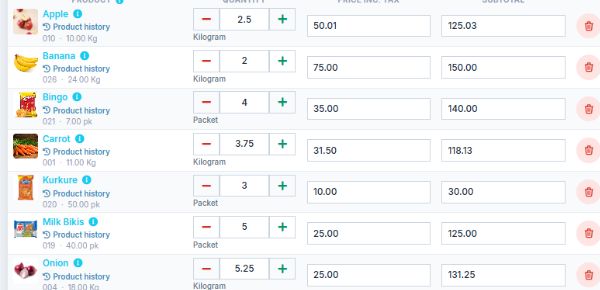
Use a grocery product to explore SKU and barcode details, selling prices, labels and the purchase-to-stock workflow.
Discuss barcode label options ↗
Bring a garment style to discuss size and colour information, alternate selling prices and label details.
Discuss selling-price groups ↗Small tools. Real working-day wins.
Bring the invoice, product or account you already work with. We’ll show the relevant workflow and answer your practical questions.
Purchase Scan is in the Flutter desktop app. Scan a supplier invoice, review the captured details, then add the purchase. Bring an invoice like one you receive to see the workflow.
See Purchase Scan with my invoiceChoose product details, preview the barcode label as a PDF, then print on label stock that suits your printer and workflow.
Show me barcode labelsCreate named selling-price groups and update product prices from the group page or product list. We’ll confirm how the workflow fits your billing setup.
Show me price groupsSelect an account and date range, then export its ledger report as a PDF for your records or review.
Show me ledger PDFsFeature access and exact steps can vary by product edition and setup. We’ll confirm the workflow for your business before you decide.
From our counters to yours
Product demos, workflow examples and customer installations, selected by the Oasis team.
Explore the video library ↗From real installation experience
Our mobile service/sales and supermarket customers give us a practical starting point for your demo.
Walk through a phone or accessory sale, the bill and the stock view. For service work, bring your current process so we can confirm the right module and setup.
Explore mobile-shop billing ↗Oasis supermarket customers use weighing-machine integration. Share your scale’s make and model so we can check compatibility and demonstrate the quantity-to-bill flow.
Explore supermarket billing ↗Workflow examples—not customer testimonials. Scale compatibility depends on the device, connection and software edition.
The everyday essentials
See GST billing, product selection and the customer bill in your walkthrough.
Explore stock and purchase records using examples from your business.
See the sales and payment reports you’ll use to understand your counter.
A clear place to start
Tell us what your counter needs. We’ll walk you through the right setup and confirm your package in a quotation.
Final pricing depends on your requirements.
Find the right setupYour quotation will confirm the included features, applicable taxes and any optional hardware or customisation.
Before you switch
A useful demo answers the practical questions, too.
Bring a sample export of your items and opening stock. We’ll review the format and agree what can be imported, what needs preparation and how to plan the switch.
Offline operation is available through the supported Oasis Windows and Android application. It varies by product and edition. Ask us to demonstrate billing with the internet disconnected on the edition and hardware you plan to use, and confirm which functions need a connection.
Share the make, model and connection type before your demo. We’ll check the proposed setup. We don’t promise compatibility with every device.
We’ll confirm the software scope, device requirements, setup and support arrangements in your quotation. You can discuss these with the team at Mount Road before deciding.
Let’s look at your counter
Tell us what you sell, how you receive stock and what slows your team down. We’ll arrange a free consultation around the workflow you want to evaluate.
Already a customer? Visit support and guides →