
Choose an item
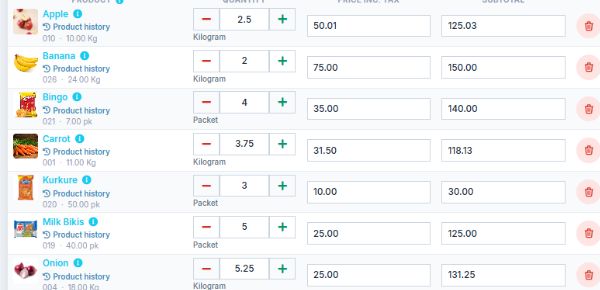
Bring examples of your phones and accessories. See product selection and quantity entry in the billing screen.
Mobile service & sales · Chennai
Explore Oasis POS billing software for phones, accessories and your service business—with the team at Oasis India IT Store, Mount Road.
Starts at ₹10,000.
Final pricing depends on your requirements.
A practical walkthrough
Start with the work at your mobile-shop counter: selling phones and accessories, checking stock and recording service requests. Use sample items to see which steps the proposed edition supports.
Bring examples of your phones and accessories. See product selection and quantity entry in the billing screen.
Walk through the sale, tax display and payment entry. Review the invoice format you need with the team.
Explore the stock and purchase views that help you keep track of what you sell.
For your service desk
Show us how you currently receive a service enquiry, bill for the work and hand the device back. We’ll demonstrate the supported steps and confirm any module or customisation needed in your quotation.
Discuss my setup ↗Before you book your demo
A phone sale, an accessory return and a repair collection can require different records. Tell us which matter to your business.
Bring a small product list and a sample invoice with customer details removed. Ask to see item selection, quantities, tax display and receipt printing for a typical sale.
If you need IMEI or serial tracking, explain where the identifier must appear: purchases, stock, invoices or returns. Ask to follow the same sample device through the steps you need.
Bring a blank job slip showing the fields you use for faults, estimates, deposits and collection. IMEI and repair features must be demonstrated and confirmed for your chosen edition; they are not assumed package inclusions.
Confirm in your quotation
Tell us your business type, number of counters and existing hardware. After the walkthrough, ask for the proposed edition, supported workflows and any extra modules or configuration to be listed in writing.
Check installation, product import, training, support, renewal arrangements and applicable taxes before choosing your package. The starting price is a starting point; your final quote depends on the work and equipment you need.
A clear place to start
Tell us what your counter needs. We’ll walk you through the right setup and confirm your package in a quotation.
Final pricing depends on your requirements.
Find the right setupYour quotation will confirm the included features, applicable taxes and any optional hardware or customisation.
Buying questions
The exact service workflow, identifiers and modules need to be confirmed for your edition. Ask us to demonstrate your required process before purchase; we do not assume it is part of the starting package. Read our mobile-shop billing & repairs decision guide →
Offline operation is available through the supported Oasis Windows and Android application. It varies by product and edition. Ask us to demonstrate the billing and hardware workflow with the internet disconnected, and confirm which functions require a connection.
Yes, we can discuss the printers, scanners and counter setup alongside your software. The quotation will identify optional hardware and setup arrangements.
Let’s look at your counter
Tell us what you sell, how you receive stock and what slows your team down. We’ll arrange a free consultation around the workflow you want to evaluate.
Already a customer? Visit support and guides →