
Check your scale
Share its make, model, connection type and whether you use printed labels. Compatibility needs to be confirmed.
Supermarkets & mini-marts · Chennai
See Oasis POS supermarket billing, stock and weighing-machine integration in a walkthrough built around your counter.
Starts at ₹10,000.
Final pricing depends on your requirements.
A practical walkthrough
Our supermarket customers use weighing-machine integration. We’ll review your setup before promising a connection or a particular workflow.
Share its make, model, connection type and whether you use printed labels. Compatibility needs to be confirmed.
Ask the team to show how weight or a scale label becomes the quantity and price in your proposed setup.
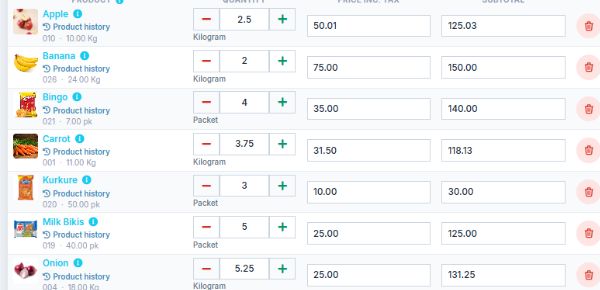
See how loose and packaged items appear on the bill, then review stock and sales records.
Before connecting a scale
Scale support depends on the device, connection and software edition. A supported installation at another shop does not mean every scale will connect. Share the model first so your demo answers the right question.
Discuss my setup ↗Before you book your demo
Loose produce, packaged goods and multiple counters need different checks. Start with your actual equipment and a mixed shopping basket.
Prepare a sample basket with weighed goods and barcoded products. Ask to see quantities, units, tax display and the printed bill. Include a correction or return if that is part of your daily process.
Share the scale model, connection details and a sample label if you use one. Ask the team to demonstrate how the proposed setup reads the weight or label and calculates the line total.
Tell us how many billing points you use and which printers, scanners and computers you already own. Ask what happens when the internet or local network is unavailable, and what recovery steps your staff would take.
Confirm in your quotation
Tell us your business type, number of counters and existing hardware. After the walkthrough, ask for the proposed edition, supported workflows and any extra modules or configuration to be listed in writing.
Check installation, product import, training, support, renewal arrangements and applicable taxes before choosing your package. The starting price is a starting point; your final quote depends on the work and equipment you need.
A clear place to start
Tell us what your counter needs. We’ll walk you through the right setup and confirm your package in a quotation.
Final pricing depends on your requirements.
Find the right setupYour quotation will confirm the included features, applicable taxes and any optional hardware or customisation.
Buying questions
No blanket compatibility promise. Share your scale’s make, model and connection details. We’ll check and demonstrate the proposed integration. Read our supermarket weighing scale compatibility guide →
Offline operation is available through the supported Oasis Windows and Android application. It varies by product and edition. Ask us to demonstrate the billing and hardware workflow with the internet disconnected, and confirm which functions require a connection.
Yes, we can discuss the printers, scanners and counter setup alongside your software. The quotation will identify optional hardware and setup arrangements.
Let’s look at your counter
Tell us what you sell, how you receive stock and what slows your team down. We’ll arrange a free consultation around the workflow you want to evaluate.
Already a customer? Visit support and guides →